How to Actually Write a Prompt for the Image-to-Prompt Tool (With Real Examples)
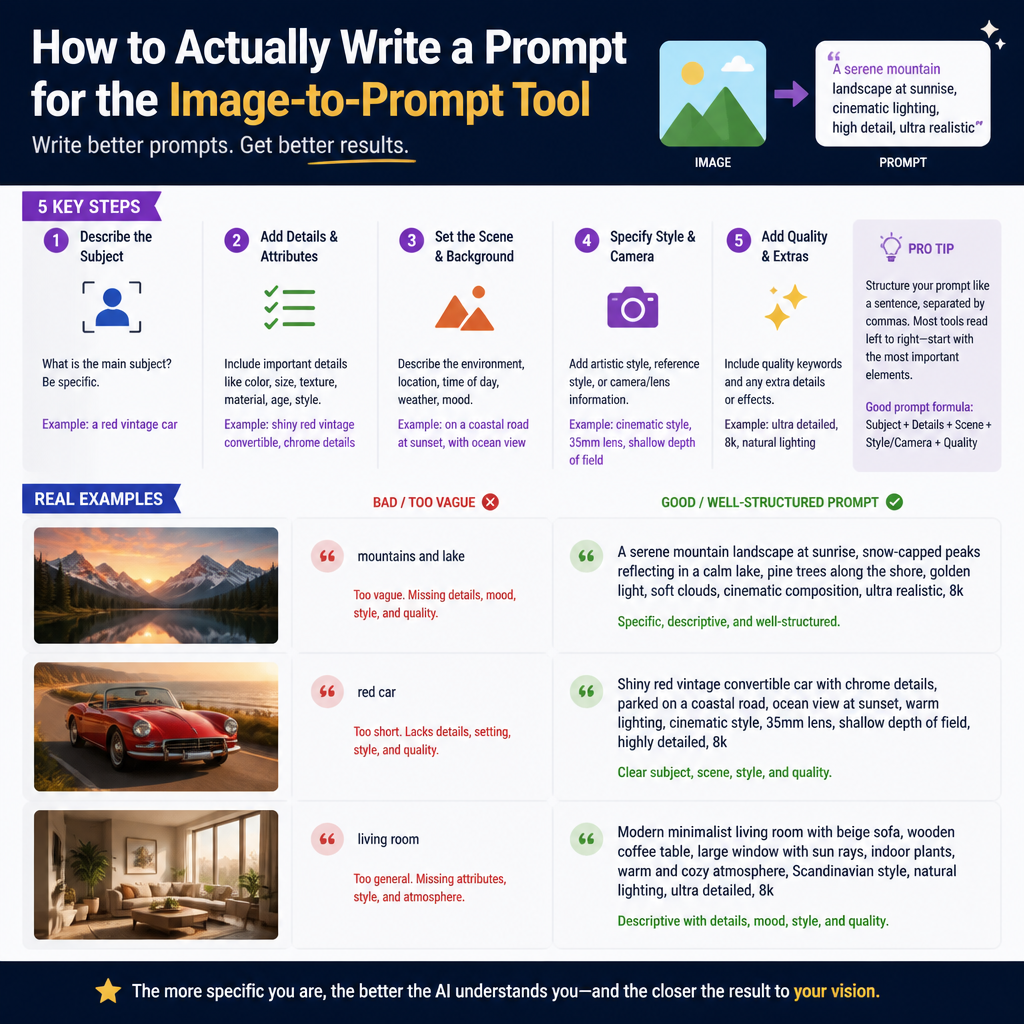
The Mechanics of Reverse Engineering an Image
Most people approach AI image generation as a one-way street: you feed words into a model like Midjourney or Stable Diffusion, and a picture comes out. The Image to Prompt tool at Instant Access Tools reverses this logic. It uses a vision-language model to scan the visual data of an uploaded file and translate pixels back into descriptive tokens.
This process is not magic, and it is not a perfect recreation of the original creator's thought process. Instead, the tool acts as a literal observer. It identifies subjects, color palettes, lighting conditions, and architectural styles. If you have ever looked at a stunning digital painting and wondered how to describe its aesthetic to another AI, this tool provides the foundational vocabulary. However, understanding what the tool sees versus what a human sees is the key to getting a result you can actually use.
Example One: The Simple Subject
To understand how the tool behaves, consider a straightforward test case. We uploaded a high-resolution photograph of a single red apple resting on a rustic wooden table with soft, natural light coming from a window.
The resulting prompt looked like this: A close-up photograph of a red apple with subtle skin texture, sitting on a dark brown weathered wood surface, soft side-lighting with deep shadows, shallow depth of field, minimalist composition.
What was accurate: the tool correctly identified the primary subject, the material of the surface, and the lighting direction. It recognized the shallow depth of field, which is a technical term for the blurred background often found in macro photography. This is useful because it gives you the specific terminology needed to replicate that look.
What was missing: the tool could not identify the specific variety of apple (e.g., Gala vs. Honeycrisp) or the exact time of day. It also failed to note that the wood was specifically oak. It gave a generic description of weathered wood. This illustrates the first rule of using the tool: it provides the structural skeleton of a prompt, but you must add the specific nouns if they are critical to your vision.
Example Two: The Complex Artistic Scene
Complex images present a more difficult challenge for vision models. We uploaded a piece of digital concept art featuring a cyberpunk city street at night, filled with neon signs, rain-slicked pavement, and a lone figure in a trench coat.
The generated prompt: Cyberpunk street scene at night, futuristic city with glowing neon signs in blue and magenta, wet asphalt with reflections, heavy rain, a person wearing a long coat standing in the middle ground, cinematic lighting, sharp focus, 8k resolution style, digital illustration.
What was accurate: the color palette (blue and magenta) and the environmental effects (wet asphalt, reflections) were captured perfectly. These are the elements that define the mood of the piece. The tool also correctly identified the perspective as middle ground.
What was missing: the tool missed the cultural nuances. It could not tell if the neon signs were in Japanese kanji or English. It did not pick up on the specific art style of the illustrator, such as whether it was painted with thick brushstrokes or clean vector lines. It summarized the aesthetic as digital illustration, which is a broad category. If you intended to replicate a specific artist's style, the tool gives you the scene description, but you would still need to append the name of the artist or a more specific art movement to the final prompt.
Refining Your Generated Prompts
Using the output of the Image to Prompt tool as a final, finished prompt is rarely the best strategy. Instead, view it as a high-quality draft. A raw output often lacks the stylistic modifiers that push an AI image generator to its limits.
To refine the output for use in other generators, follow a tripartite structure. First, keep the core subject description the tool provided. Second, add specific technical parameters. For example, if the tool says soft lighting, you might upgrade that to volumetric lighting or golden hour for more drama. Third, define the medium more strictly. If the tool says photograph, specify if it should look like it was shot on a 35mm film camera or a modern DSLR with a 50mm lens.
If you are working with specific file types, you might notice varying levels of detail in the tool's performance based on the clarity of the source. For example, a compressed JPG might lose the fine textures that the tool needs to describe surface materials accurately. You can learn more about how different file types handle visual data in our guide on webp-vs-png-vs-jpg-2026.
The Reality of Vision Model Limitations
It is important to be honest about what this technology cannot do. The tool does not have access to the metadata of the original file, nor does it have an intuitive understanding of intent.
It cannot infer camera settings like ISO, shutter speed, or aperture through psychic means; it only guesses based on the visual artifacts it finds. It cannot tell the difference between a deliberate artistic choice and a technical limitation of the original camera. If an image is blurry, the tool might describe it as motion blur even if the original photographer simply missed the focus.
Furthermore, the tool cannot identify brand names or specific copyrighted characters with 100 percent certainty unless they are globally iconic. If you upload a picture of a niche indie game character, the tool will likely describe a person in armor or colorful clothing rather than naming the character. This is actually a benefit for creative work, as it forces the prompt to focus on the visual elements rather than relying on a single proper noun.
Strategic Use Cases
This tool is most effective when used for troubleshooting. If you have been trying to generate a specific aesthetic and failing, find an image that represents what you want, run it through the tool, and look for the keywords you were missing. You might find that the word you needed was chiaroscuro or isometric perspective—terms that the vision model is trained to recognize even if they aren't in your everyday vocabulary.
It is also an excellent bridge for cross-platform workflows. If you have an image generated in one model and want to recreate the vibe in a different model with a different architecture, the Image to Prompt tool provides a neutral, descriptive middle ground that translates well across various AI ecosystems.
The goal is not to find a magic button that handles all your creative thinking. The goal is to reduce the friction between seeing a visual concept and being able to articulate it in a way that a machine understands. By treating the tool as a sophisticated translator rather than a final author, you can significantly improve the accuracy of your own generative art projects.
Try it: https://kind-cloud-generator.lovable.app/tools/image-to-prompt
Try our related free tools
Put this guide into practice with our free image compressor, PDF merger, and AI grammar checker — all run in your browser with no signup.
Related articles
Why AI Captions Sometimes Miss Your Brand's Tone (And How to Fix It in One Edit)
If you have spent any time using large language models or specialized social media tools to generate captions, you have likely encountered the uncanny valley of marketing copy. You input a few details about your product or photo, hit generate, and what returns is technically corr
What 'AI-Generated' Actually Means for the Captions and Posts These Tools Produce
When you use an AI tool to generate a social media post or a caption, you are essentially engaging with a high-speed prediction engine. Despite the marketing language often used in the industry, these tools do not think, nor do they understand your business goals in a human sense
AI Tool Output Isn't Final Copy — A Realistic Workflow for Using These Generators
The biggest lie in the productivity space right now is the idea of the one-click solution. You have likely seen the marketing: enter a topic, hit a button, and receive a completed masterpiece ready for publication. If you approach AI tools with this mindset, you are going to prod
The Difference Between a Viral Post and an Engaging Post (And Why Generators Can Only Help With One)
The term viral has been stripped of its technical meaning and turned into a marketing buzzword.
About the author
Instant Access Tools Team
Reviewed by the Instant Access Tools Editorial Team
Our editorial team builds and reviews free browser-based tools for PDFs, images, calculators and AI utilities. Every guide is written by writers who use the tools themselves and reviewed for accuracy before publication.